

We tested the Chinese marine aquarium LED light A8 PRO II Blue, a not-so-hidden clone of Radion. At one third of the cost, will it deliver the same performance? Let’s find out in our review in the DaniReef LAB.
The configuration of the new A8 Pro II Blue looks similar to Radion. Same case, same dimensions, same number of channels (8), but that’s where the similarities end. Different LEDs, different spectrum (at least visually), different LED lenses. The A8 is more powerful, about 33% more, so we were very curious to review it in depth in the DaniReef LAB. And, seeing it side by side with the Radion G5 Blue, who will win? Let’s analyze its features, then compare it to the Radion.
Technical Specifications A8 Pro II Blue
The fixture is rectangular, 4.6 cm tall, with a footprint of 36.7×20.2 cm. The LEDs of the A8 Pro II Blue, as we mentioned, are 9 different types grouped into 8 channels.
| A8 PRO II Blue | |
| Length | 30 cm |
| Width | 18 cm |
| Height | 3.5 cm |
| Power Consumption | 240 watt |
| LED Configuration | |
| Cool White LEDs | 8 |
| Royal Blue LEDs | 32 |
| Blue LEDs | 32 |
| Sky Blue LEDs | 6 |
| Violet 395 nm LEDs | 4 |
| Violet 405 nm LEDs | 2 |
| Violet 415 nm LEDs | 4 |
| Violet 430 nm LEDs | 8 |
| Warm White LEDs | 4 |
| Total LEDs | 100 |

Our Video Review of the A8 Pro II Blue
The video is quite long, so sit back and get comfortable. After a quick unboxing, we discuss its power, its 4 weak points, and the comparison with the Radion G5.
Build Quality
The build quality of the fixture is good; the materials feel soft to the touch, but they’re not as solid as those from more established brands. On the top there’s a grid, under which lies the fan that expels air sideways, which is identical to the Radion.

The LED Channels
The app is perhaps one of the weakest points of the light. Unstable, complex to use, and not very user-friendly. It’s one of the compromises to accept with this lamp. Still, from the app you can control all 8 available channels.

Above you can see the 8 sliders controlling the 8 channels, each represented with the dominant color of the channel. At the top, you can also see the percentage of each channel, repeated next to the channel name.
Below you can see the fixture with all LEDs turned on.

How to program the A8 Pro II Blue v.20250728
To use the fixture, you need to install the AIPAI App, available both on the Apple and Android app stores. It can also be downloaded by scanning the QR code on the lamp’s packaging. Once downloaded and installed, open it and set the time zone.
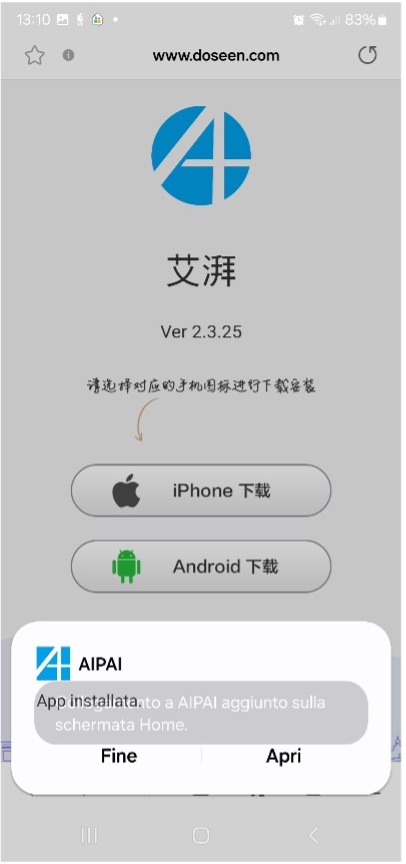
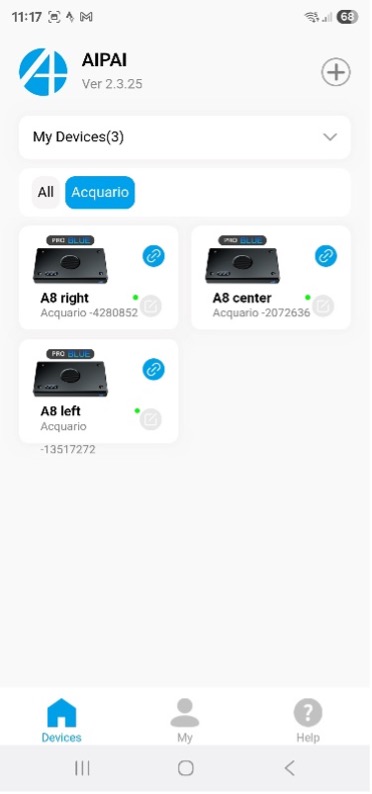
Next, click the “+” symbol at the top right to enter the Wi-Fi settings, stand near the fixture, and look for the Alight network followed by the serial number of the lamp. If you own more than one unit, the configuration must be done one at a time, repeating the same steps. The Wi-Fi network will appear like “ALight-*****”.
Select the desired one and return to the app: the fixture will now be added. At this point, you need to restart the app and click on the lamp to enter its configuration. If you own multiple tanks with these lights, you can create groups and name them as you wish, for example Aquarium-1, 2, 3, etc.
You can choose the manual mode and set each of the 8 channels individually, adjusting on/off times, ramp-up, plateau, ramp-down, and shut-off — all at your preferred intensity hour by hour. Alternatively, you can use the convenient presets and select the type of animals (Soft corals – SPS – LPS), choosing what you prefer in terms of color, coral/fish growth, and health. These presets already include ramp settings, but you can also modify them and save your own custom profile with a personal name/code.
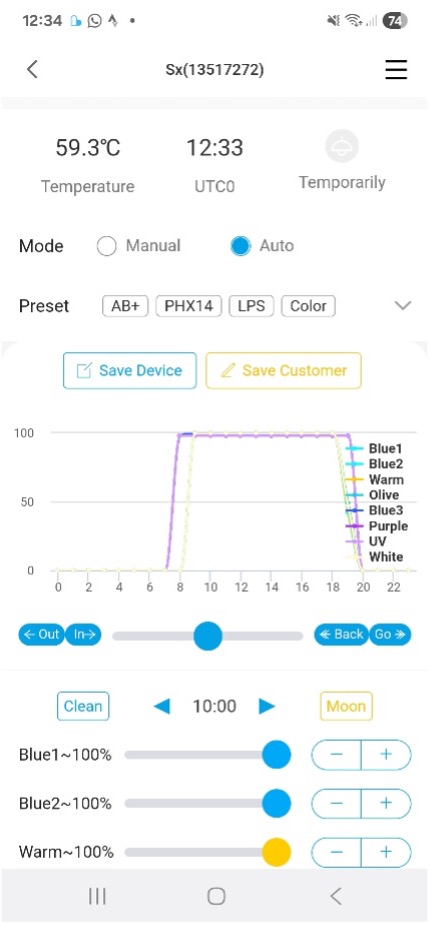
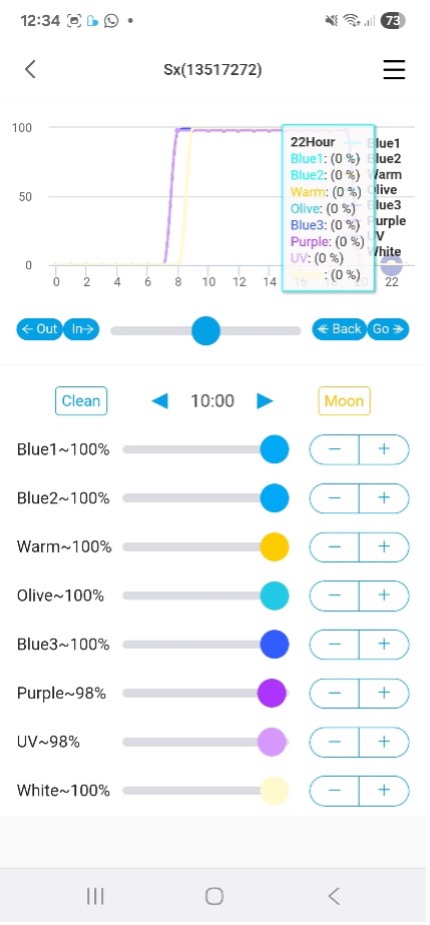
The lamp also allows you to generate storm effects and moonlight. The process is a bit cumbersome but offers a complete range of settings for any requirement.
Once saved, the configuration can be applied to any number of fixtures. But in case of trouble… trouble indeed! Because while everything seems perfect — a well-built lamp, attractive design (practically identical to the Radion G6), great light output, and flexible though cumbersome programming — there is one critical flaw:
⚠️ If power is lost for just 10–20 seconds, the configuration is erased. When electricity comes back, the lamp restarts with its default preset. This is quite frustrating, since restoring it requires deleting the lamp from the group (e.g., Aquarium-1), because the app no longer recognizes it, and repeating the entire initial setup. ⚠️
The only partial relief is that if you saved a custom configuration, once the lamp is re-added you can reload the settings and make it run again fairly quickly. Still, this software bug (easily fixable by the developers, in my opinion, but still present today) can cause problems and potentially harm the animals in your tank.
Our new DaniReef LAB method for PAR measurement
To compare PAR values between different fixtures, we use the Apogee MQ-510 Quantum Meter on a custom 70×70 cm test bench, taking measurements at 17, 37, and 57 cm. The readings are corrected with the immersion factor to ensure accuracy.

Alongside the MQ-510, we also rely on the ITC PARwise PRO, which not only measures PAR but also provides spectral analysis and, most importantly, cPUR (Coral Photosynthetically Usable Radiation). Unlike raw PAR, cPUR focuses only on wavelengths that corals can effectively use, giving a more realistic picture of light quality. The PARwise also allows deeper insights into spectrum and pigment responses, which we’ll explore later in our analysis.

PAR measurement
Here are the three measurements we took at 17, 37, and 57 cm. Each shows both the PAR values and the corresponding coverage curve, giving a clear picture of how the light spreads at different heights.


Central PAR at the three distances
Let’s continue with the technical readings. Below you can see, in a single chart, how the central PAR values decrease across the three test distances.

A8 Pro II Blue energy variation by distance

In my opinion this is the most significant and comparable metric we measured: the energy variation.
For the A8 PRO II Blue these values are very consistent, even as distribution goes from strongly centered to fairly even across the surface. Depending on the animals you keep, this is excellent for tanks up to 60 cm wide, and good for aquariums 70–80 cm wide. Keep in mind that although coverage is good, light rays will hit the sides at a steep angle in wider tanks, so the effect on corals will differ from that of a broader-panel fixture like ATI Straton, GNC BluRay X, or Philips CoralCare.

The A8 Pro II Blue light spectrum
Thanks to the ITC PARwise PRO we also measured other values, including the light spectrum and the important cPUR.


Above you can see the spectrum as measured by the PARwise PRO. The spectrum is reconstructed from discrete sampling points, so the curve is not as “perfect” as that from a high-end spectroradiometer; nevertheless, it gives a sufficiently accurate idea and shows a marked prevalence around 449 nm, where it achieves maximum PAR.
The spectrum appears virtually identical at the three distances considered and indicates maximum lux and PAR, summarized in the following table.
| PAR | LUX | |
| 17 cm center | 2208 μmol m-2 s-1 | 43043 lux |
| 37 cm center | 586 μmol m-2 s-1 | 11270 lux |
| 57 cm center | 281 μmol m-2 s-1 | 5475 lux |
These values, measured at the center, are about 2% higher than those measured with the Apogee MQ-510.
cPUR of the A8 Pro II Blue
Below is the green curve indicating cPUR — Coral Photosynthetically Usable Radiation — i.e., the maximum photosynthetically usable radiation for corals. As said, cPUR is designed specifically for corals: raw PAR may be high but concentrated in the wrong spectral region.


We can see that the spectrum of the A8 Pro II Blue lies entirely beneath that hypothetical cPUR curve. In practice, there’s virtually no dispersion of light that corals can’t use — and that’s what matters. The reading indicates that only about 0.44% of the total power is spent without benefiting corals. It must be said, however, that according to this curve the fixture meets only 31% of corals’ needs.
Per-channel values at the center for the three distances
We also measured values for each single channel, but only at the center, to give you an idea of each channel’s contribution to emitted PAR.

Here are the measured values:
| Distance = 17 cm | % of PAR | % of power | |
| Channel 1: | 457 μmol m-2 s-1 | 20 % | 19 % |
| Channel 2: | 452 μmol m-2 s-1 | 20 % | 20 % |
| Channel 3: | 79 μmol m-2 s-1 | 3 % | 4 % |
| Channel 4: | 77 μmol m-2 s-1 | 3 % | 7 % |
| Channel 5: | 702 μmol m-2 s-1 | 30 % | 23 % |
| Channel 6: | 181 μmol m-2 s-1 | 8 % | 10 % |
| Channel 7: | 164 μmol m-2 s-1 | 7 % | 10 % |
| Channel 8: | 191 μmol m-2 s-1 | 8 % | 8 % |
If we plot the PAR values in a chart, the difference becomes even clearer.

The eight channels appear (un)balanced at 3 vs 5. The heavy lifters are Channels 1, 2, and 5, all in the blue band, providing the bulk of the PAR — as the product name suggested. The other five channels contribute marginally. The first three channels sum to 70% of PAR with 62% of the power draw, while the remaining five consume 38% and deliver only 30% of PAR.
Power Consumption
Instantaneous power readings were made possible by the handy RCE PM600. The result is given directly in watts.

The A8 Pro II Blue therefore draws 243 watts, a value close to the claimed spec. Considering that at 17 cm the fixture delivers 2161 μmol m-2 s-1 at the center, its peak efficiency is 8.89 μmol m-2 s-1 W-1 (PAR per watt) — rather low; not because PAR is low (it’s high), but because power consumption is very high. For comparison, the Radion achieves roughly the same PAR while using about 50 watts less. So to get the same PAR, the A8 Pro II Blue uses 33% more power. Compared to the Orphek Natura, it even produces fewer PAR while the Natura consumes 100 watts less (150 W for Natura, with higher PAR than the A8 Pro II Blue at 250 W).
A8 Pro Blue II and heat
The A8 Pro II Blue uses active cooling, with a fan controlled by a sensor on the PCB.

Radion G5 Blue vs A8 Pro II Blue: who will win?

Given the similarity between the two fixtures, it seemed right to compare them. Unfortunately we have not (yet) had the G6 Blue in our hands, so we are comparing the 2024 A8 Pro II Blue with the 2020 Radion G5 Blue, whose review you can read here: Ecotech Marine Radion XR30 G5 Blue finalmente nel DaniReef LAB. So there are 4 years of development between the two fixtures. But let’s see the results together.

As you can see, at 37 cm distance the A8 delivers 6% more power.

The coverage graph, again at 37 cm, also shows the A8 as slightly superior. But on paper, the difference is rather negligible.

However, analyzing consumption we see there is an important power difference between the two fixtures. We do have, roughly, 6% more PAR, but at the cost of a 20% increase in consumption. In perspective this means that each year, roughly, you will consume about 130 kWh more, for an extra cost of 35 euros per year per lamp. But before drawing your conclusions, read what else we have to say.
For now we can say the two fixtures produce about the same PAR, but one consumes 20% more than the other, while costing about 40% (of the other’s price).
Defects found on the A8 Pro II Blue
As we told you at the beginning, we had 3 A8 fixtures in our hands. We did not test them all in the same way, but we measured PAR and central consumption on all three. We found that beyond the first one we measured at 243 watts, the second consumed 255 while the third only 196.50, as you can see in the photo we took.

PAR obviously varied proportionally. But the problem from this point of view is another one. A fixture that consumes much more to deliver the same PAR is a fixture that develops more heat, with effects that could be harmful for the LEDs soldered on the board itself.
Furthermore, the difference between the three fixtures does not guarantee their homogeneity. It could absolutely be a coincidence, but who assures us that if we had ordered only one, we would have received the “normal” one? Absolutely commendable was the company’s behavior: once informed about the consumption discrepancy, they immediately sent Andres a replacement for the clearly defective unit.
Another flaw is the difficulty of programming we mentioned on page one. The app is slow and cumbersome.
But this is not the worst thing.
As of the day we write this, if the fixture is plugged in and the power goes out, it must be reconfigured manually. Something that, if not resolved, prevents us from recommending this fixture. A brief outage would be enough to leave our aquarium with the wrong lighting, for a random duration, and if this happens while you are on vacation it could be a serious problem.

Maintenance Costs
The A8 Pro II Blue fixtures currently cost €548.98 list, but on AliExpress they can also be found at €350 on sale, as for example by clicking here.
We saw that the power draw is 243 watts, so a cost/watt ratio of about €2.27 per watt when considering list price, otherwise it would be €1.44. One of the highest values we have ever recorded.
If we go back to the 243 watt consumption and consider 8 hours at maximum (in reality it will run longer, but with sunrise/sunset ramps), we can estimate yearly consumption at about 708 kWh, and a cost of €191 per year per fixture (considering the energy cost at €0.27 per kWh).
Final considerations on the A8 Pro II Blue
The fixture is built fairly well, and shows low efficiency but at a very low cost. The economic efficiency is therefore extremely high, but the technical efficiency, i.e., PAR produced per watt, is rather low — one of the worst.
Below is the spectral distribution (PFFD) at various depths measured in clear ocean waters. The values are as follows:
| 1 m | 5 m | 10 m | 15 m | 20 m | |
| PFFD (µmol/m²/s) | 1640 | 958 | 618 | 436 | 316 |
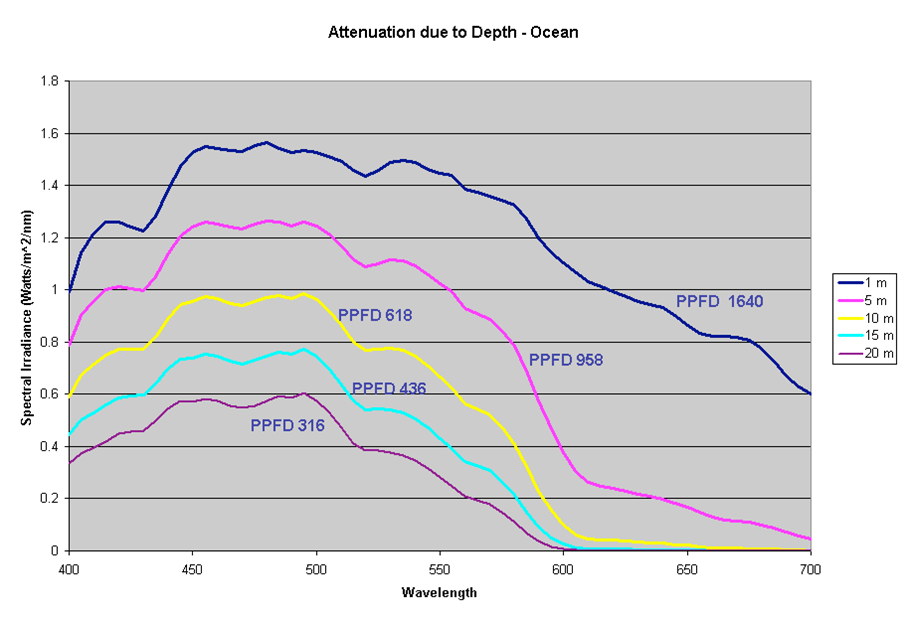
So at 37 cm distance with an A8 Pro II Blue set to maximum we obtain 535 µmol/m²/s with Apogee and 586 µmol/m²/s with PARWISE PRO. An approximate value in Nature corresponding to 11–12 meters below sea level. More than enough power! And it should allow you to keep practically any coral.
The values are very good for tanks aimed at keeping SPS as well as anything else. By pairing multiple fixtures you can then keep everything with any desired color temperature. I would recommend 2 fixtures on 120 cm and 3 on 180, and respectively 3 or 4 to get the most and push where other fixtures cannot go. Obviously, if we consider demanding SPS, the central band would be preferable given the physiological center–edge drop and the light angle. The power produced is very good especially at shallow depth, as is obvious. As depth increases, power decreases to achieve greater coverage, which always remains quite wide. The doubts, given the high consumption, are about long-term durability and the lack of homogeneity between identical fixtures. Remember though that this is not a Radion, the spectrum is different as are the channels.
PROS
 Very low price;Rather high PAR;
CONS
 20% higher consumption at equal PAR than a fixture 4 years older;Three fixtures with three different outputs, one of which much lower than the other two;Embarrassing software;Must be manually re-set when power returns after an outage.

In collaboration with DaniReef.com, the top reefkeeping magazine in Italy and Europe
Disclaimer: The A8 Pro II Blue fixture used for this test was provided by our friend Andres, who uses them on his aquarium. Some links in the article may include affiliate codes with sponsored partners.






0 Comments